
6.8 KiB
Bullet Train for oh-my-zsh 

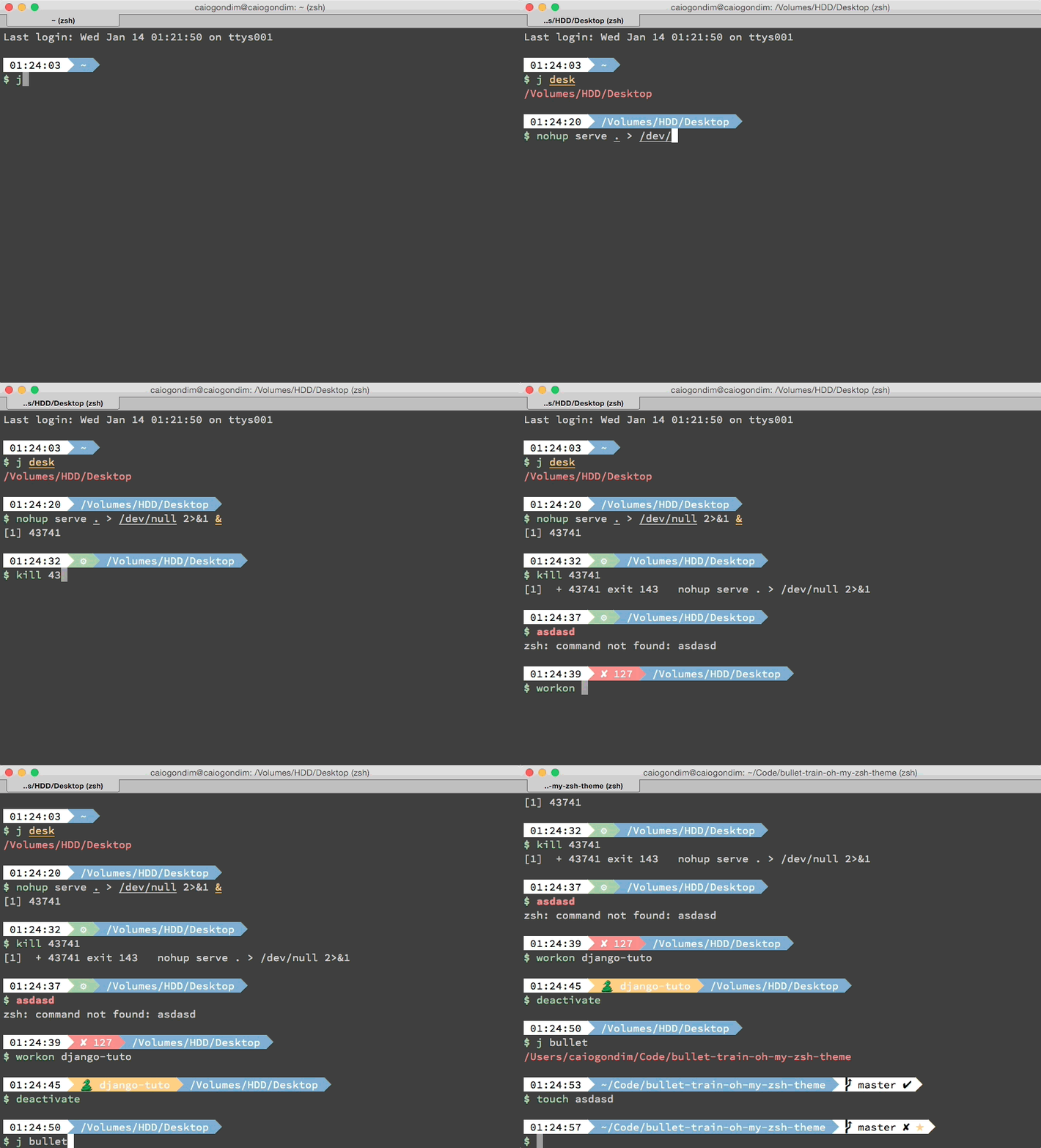
Bullet Train is a oh-my-zsh shell theme based on the Powerline Vim plugin. It aims for simplicity, showing information only when it's relevant.
It currently shows:
- Current Python virtualenv
- Current Ruby version and gemset, through RVM
- Current Node.js version, through NVM
- Git status
- Timestamp
- Current directory
If you want add some new feature, of fix some bug, open an issue and lets hack together.
Preview
Other color schemes
It's better to use Bullet Train with a dark background color scheme. Below you can check Bullet Train with some popular dark color schemes.
Solarized Dark

Monokai

Tomorrow Night Eighties

Tomorrow Night Bright

Requirements
In order to use the theme, you will first need:
- Vim Powerline patched
- oh-my-zsh
- Make sure terminal is using 256-colors mode with
export TERM="xterm-256color"
Installing
For oh-my-zsh users
-
Download the theme here
-
Put the file bullet-train.zsh-theme in ~/.oh-my-zsh/themes/
-
Configure the theme in your ~/.zshrc file:
ZSH_THEME="bullet-train"
For antigen users
Add the following snippet to your .zshrc somewhere after the line
antigen use oh-my-zsh.
antigen theme https://github.com/caiogondim/bullet-train-oh-my-zsh-theme bullet-train
Options
Bullet Train is configurable. You can change colors and which segments you want or don't want to see. All options must be overridden in your .zshrc file.
The character used for prompt and if you want to be warned when running as root:
BULLETTRAIN_PROMPT_CHAR="\$"
BULLETTRAIN_PROMPT_ROOT=true
The status segment background. Shows if the last command exited with error, and if there is jobs on background running:
BULLETTRAIN_STATUS_SHOW=true
BULLETTRAIN_EXIT_SHOW=false
BULLETTRAIN_STATUS_BG=green
BULLETTRAIN_STATUS_ERROR_BG=red
BULLETTRAIN_STATUS_FG=black
The time segment background, foreground color and visibility:
BULLETTRAIN_TIME_SHOW=true
BULLETTRAIN_TIME_BG=''
BULLETTRAIN_TIME_FG=''
Context
Shows username and machine name when in some different value than default. To
set the default user use the BULLETTRAIN_CONTEXT_DEFAULT_USER variable. To
show the context segment in when ssh'ing, set the BULLETTRAIN_IS_SSH_CLIENT in
the remote machine.
Default values:
BULLETTRAIN_CONTEXT_SHOW=false
BULLETTRAIN_CONTEXT_BG=black
BULLETTRAIN_CONTEXT_FG=default
# BULLETTRAIN_CONTEXT_DEFAULT_USER
# BULLETTRAIN_IS_SSH_CLIENT
Python virtualenv background, foreground color, visibility and the symbol used for the segment:
BULLETTRAIN_VIRTUALENV_SHOW=true
BULLETTRAIN_VIRTUALENV_BG=yellow
BULLETTRAIN_VIRTUALENV_FG=white
BULLETTRAIN_VIRTUALENV_PREFIX=🐍
Node.js background, foreground color, visibility and prefix for the segment:
BULLETTRAIN_NVM_SHOW=true
BULLETTRAIN_NVM_BG=green
BULLETTRAIN_NVM_FG=white
BULLETTRAIN_NVM_PREFIX="⬡ "
RMV backgound and foreground color, visibility and symbol used for the segment:
BULLETTRAIN_RVM_SHOW=true
BULLETTRAIN_RVM_BG=magenta
BULLETTRAIN_RVM_FG=white
BULLETTRAIN_RVM_PREFIX=♦️
Current directory background, foreground color and visibility:
BULLETTRAIN_DIR_SHOW=true
BULLETTRAIN_DIR_BG=blue
BULLETTRAIN_DIR_FG=white
BULLETTRAIN_DIR_EXTENDED=true
Git background, foreground color, visibility and details:
BULLETTRAIN_GIT_SHOW=true
BULLETTRAIN_GIT_BG=white
BULLETTRAIN_GIT_FG=black
BULLETTRAIN_GIT_EXTENDED=true
Git icons info:
BULLETTRAIN_GIT_PREFIX=""
BULLETTRAIN_GIT_SUFFIX=""
BULLETTRAIN_GIT_DIRTY="✘"
BULLETTRAIN_GIT_CLEAN="✔"
BULLETTRAIN_GIT_ADDED="%F{green}✚%F{black}"
BULLETTRAIN_GIT_MODIFIED="%F{blue}✹%F{black}"
BULLETTRAIN_GIT_DELETED="%F{red}✖%F{black}"
BULLETTRAIN_GIT_UNTRACKED="%F{yellow}✭%F{black}"
BULLETTRAIN_GIT_RENAMED="➜"
BULLETTRAIN_GIT_UNMERGED="═"
BULLETTRAIN_GIT_AHEAD=" ⬆"
BULLETTRAIN_GIT_BEHIND=" ⬇"
BULLETTRAIN_GIT_DIVERGED=" ⬍"
Contributors
That project was originally a fork from
Powerline, but
most of the code was later erased and its now more closely related to
Agnoster. Below is a git summary
of the project:
58  Caio Gondim
33  Jérémy Romey
7  Jocelyn Mallon
6  Jérémy Romey
5  Arthur Wang
4  Flavius Aspra
3  Dan Kaplun
2  itsZero (Chien-An Cho)
2  wujtruj
1  yachi
1  Guillaume BINET
1  Joe Block
1  Kevin
1  Marius Krämer
1  illuminatis
1  krischer
1  m.kuehn
1  Adrien Brault
Credits
This theme is highly inspired by the following themes:
License
The MIT License (MIT)
Copyright (c) 2014 Caio Gondim
Permission is hereby granted, free of charge, to any person obtaining a copy of this software and associated documentation files (the "Software"), to deal in the Software without restriction, including without limitation the rights to use, copy, modify, merge, publish, distribute, sublicense, and/or sell copies of the Software, and to permit persons to whom the Software is furnished to do so, subject to the following conditions:
The above copyright notice and this permission notice shall be included in all copies or substantial portions of the Software.
THE SOFTWARE IS PROVIDED "AS IS", WITHOUT WARRANTY OF ANY KIND, EXPRESS OR IMPLIED, INCLUDING BUT NOT LIMITED TO THE WARRANTIES OF MERCHANTABILITY, FITNESS FOR A PARTICULAR PURPOSE AND NONINFRINGEMENT. IN NO EVENT SHALL THE AUTHORS OR COPYRIGHT HOLDERS BE LIABLE FOR ANY CLAIM, DAMAGES OR OTHER LIABILITY, WHETHER IN AN ACTION OF CONTRACT, TORT OR OTHERWISE, ARISING FROM, OUT OF OR IN CONNECTION WITH THE SOFTWARE OR THE USE OR OTHER DEALINGS IN THE SOFTWARE.