mirror of
https://github.com/Cornelicorn/bullet-train.zsh.git
synced 2025-12-06 11:50:38 +01:00

361 lines
12 KiB
Markdown
361 lines
12 KiB
Markdown
<img src="http://rawgit.com/caiogondim/bullet-train-oh-my-zsh-theme/master/img/icon.svg" width="100%" />
|
||
|
||
# Bullet Train for oh-my-zsh <a href="http://webchat.freenode.net/?channels=bullettrain-sh" target="_blank"><img src="https://img.shields.io/badge/IRC-bullettrain–sh-1e72ff.svg?style=flat" height="20"></a>
|
||
|
||
Bullet Train is a [oh-my-zsh shell](https://github.com/robbyrussell/oh-my-zsh)
|
||
theme based on the
|
||
[Powerline Vim plugin](https://github.com/Lokaltog/vim-powerline). It aims for
|
||
simplicity, showing information only when it's relevant.
|
||
|
||
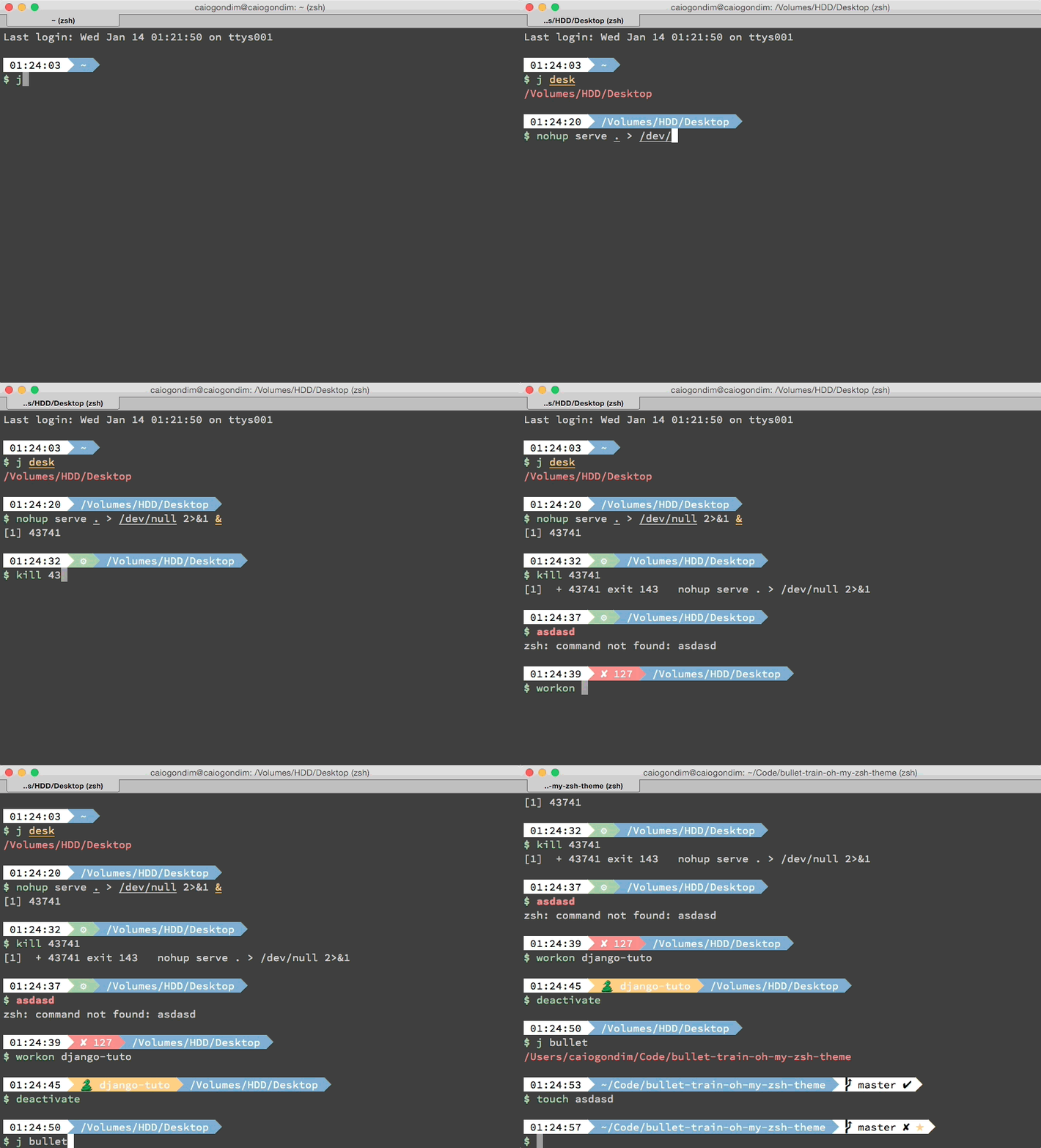
It currently shows:
|
||
- Current Python virtualenv; when using Pyenv and no active virtualenv shows the current Python version the shell uses
|
||
- Current Ruby version using chruby; version and gemset when on RVM or Rbenv
|
||
- Current Node.js version, through NVM (if present) or Node.js
|
||
- Current Perl version using plenv
|
||
- Current Elixir version
|
||
- Git status
|
||
- Timestamp
|
||
- Current directory
|
||
- Background jobs
|
||
- Exit code of last command
|
||
|
||
If you want add some new feature, of fix some bug, open an issue and lets hack
|
||
together.
|
||
|
||
For a tmux theme to work with it, I suggest [Maglev](https://github.com/caiogondim/maglev).
|
||
|
||
## Preview
|
||
|
||
|
||
|
||
|
||
## Requirements
|
||
|
||
In order to use the theme, you will first need:
|
||
|
||
* Powerline compatible fonts like [Vim Powerline patched fonts](https://github.com/Lokaltog/powerline-fonts), [Input Mono](http://input.fontbureau.com/) or [Monoid](http://larsenwork.com/monoid/).
|
||
* On Ubuntu like systems you'll need the `ttf-ancient-fonts` package to correctly display some unicode symbols that are not covered by the Powerline fonts above.
|
||
* A ZSH framework like [antigen](https://github.com/zsh-users/antigen), [oh-my-zsh](https://github.com/robbyrussell/oh-my-zsh) or [zgen](https://github.com/tarjoilija/zgen)
|
||
* Make sure terminal is using 256-colors mode with `export TERM="xterm-256color"`
|
||
* For [iTerm 2](http://iterm2.com/) users, make sure you go into your settings and set both the regular font and the non-ascii font to powerline compatible [fonts](https://github.com/powerline/fonts) or the prompt separators and special characters will not display correctly.
|
||
|
||
|
||
## Installing
|
||
|
||
### For oh-my-zsh users
|
||
|
||
1. Download the theme [here](http://raw.github.com/caiogondim/bullet-train-oh-my-zsh-theme/master/bullet-train.zsh-theme)
|
||
|
||
2. Put the file **bullet-train.zsh-theme** in **$ZSH_CUSTOM/themes/**
|
||
|
||
3. Configure the theme in your **~/.zshrc** file:
|
||
|
||
```bash
|
||
ZSH_THEME="bullet-train"
|
||
```
|
||
|
||
### For antigen users
|
||
|
||
Add the following snippet to your **.zshrc** somewhere after the line
|
||
`antigen use oh-my-zsh`.
|
||
|
||
```bash
|
||
antigen theme https://github.com/caiogondim/bullet-train-oh-my-zsh-theme bullet-train
|
||
```
|
||
|
||
### For Zgen users
|
||
|
||
If you're using [zgen](https://github.com/tarjoilija/zgen), add the following line to your **~/.zshrc** where you're adding your other zsh plugins **after** the line `zgen oh-my-zsh`.
|
||
|
||
```bash
|
||
zgen load caiogondim/bullet-train-oh-my-zsh-theme bullet-train
|
||
```
|
||
|
||
### For Zplug users
|
||
|
||
If you're using [zplug](https://github.com/zplug/zplug), add the following line
|
||
to your **~/.zshrc** where you're adding your other zsh plugins.
|
||
|
||
```bash
|
||
setopt prompt_subst # Make sure prompt is able to be generated properly.
|
||
zplug "caiogondim/bullet-train.zsh", use:bullet-train.zsh-theme, defer:3 # defer until other plugins like oh-my-zsh is loaded
|
||
```
|
||
|
||
## Options
|
||
|
||
Bullet Train is configurable. You can change colors and which segments you want
|
||
or don't want to see. All options must be overridden in your **.zshrc** file.
|
||
|
||
### Order
|
||
`BULLETTRAIN_PROMPT_ORDER` defines order of prompt segments. Use zsh array
|
||
syntax to specify your own order, e.g:
|
||
|
||
```bash
|
||
BULLETTRAIN_PROMPT_ORDER=(
|
||
git
|
||
context
|
||
dir
|
||
time
|
||
)
|
||
```
|
||
|
||
NOTE: You do not need to specify *end* segment - it will be added automatically. With this you can also specify custom segments.
|
||
|
||
### Prompt
|
||
|
||
|Variable|Default|Meaning
|
||
|--------|-------|-------|
|
||
|`BULLETTRAIN_PROMPT_CHAR`|`\$`|Character to be show before any command
|
||
|`BULLETTRAIN_PROMPT_ROOT`|`true`|Highlight if running as root
|
||
|`BULLETTRAIN_PROMPT_SEPARATE_LINE`|`true`|Make the prompt span across two lines
|
||
|`BULLETTRAIN_PROMPT_ADD_NEWLINE`|`true`|Adds a newline character before each prompt line
|
||
|
||
|
||
### Status
|
||
|
||
|Variable|Default|Meaning
|
||
|--------|-------|-------|
|
||
|`BULLETTRAIN_STATUS_EXIT_SHOW`|`false`|Show/hide exit code of last command
|
||
|`BULLETTRAIN_STATUS_BG`|`green`|Background color
|
||
|`BULLETTRAIN_STATUS_ERROR_BG`|`red`|Background color of segment when last command exited with an error
|
||
|`BULLETTRAIN_STATUS_FG`|`black`|Foreground color
|
||
|
||
### Time
|
||
|
||
|Variable|Default|Meaning
|
||
|--------|-------|-------|
|
||
|`BULLETTRAIN_TIME_12HR`|`false`|Format time using 12-hour clock (am/pm)
|
||
|`BULLETTRAIN_TIME_BG`|`white`|Background color
|
||
|`BULLETTRAIN_TIME_FG`|`black`|Foreground color
|
||
|
||
### Custom
|
||
|
||
|Variable|Default|Meaning
|
||
|--------|-------|-------|
|
||
|`BULLETTRAIN_CUSTOM_MSG`|`false`|Free segment you can put a custom message which will be eval'ed for every prompt
|
||
|`BULLETTRAIN_CUSTOM_BG`|`black`|Background color
|
||
|`BULLETTRAIN_CUSTOM_FG`|`default`|Foreground color
|
||
|
||
### Context
|
||
|
||
|Variable|Default|Meaning
|
||
|--------|-------|-------|
|
||
|`BULLETTRAIN_CONTEXT_BG`|`black`|Background color
|
||
|`BULLETTRAIN_CONTEXT_FG`|`default`|Foreground color
|
||
|`BULLETTRAIN_CONTEXT_DEFAULT_USER`|none|Default user. If you are running with other user other than default, the segment will be showed.
|
||
|`BULLETTRAIN_CONTEXT_HOSTNAME`|`%m`|Hostname. Set %M to display the full qualified domain name.
|
||
|`BULLETTRAIN_IS_SSH_CLIENT`|none|If `true`, the segment will be showed.
|
||
|
||
### Python virtualenv (+Pyenv)
|
||
|
||
|Variable|Default|Meaning
|
||
|--------|-------|-------|
|
||
|`BULLETTRAIN_VIRTUALENV_BG`|`yellow`|Background color
|
||
|`BULLETTRAIN_VIRTUALENV_FG`|`white`|Foreground color
|
||
|`BULLETTRAIN_VIRTUALENV_PREFIX`|`🐍`|Prefix of the segment
|
||
|
||
### node.js nvm
|
||
|
||
|Variable|Default|Meaning
|
||
|--------|-------|-------|
|
||
|`BULLETTRAIN_NVM_BG`|`green`|Background color
|
||
|`BULLETTRAIN_NVM_FG`|`white`|Foreground color
|
||
|`BULLETTRAIN_NVM_PREFIX`|`"⬡ "`|Prefix of the segment
|
||
|
||
### Ruby RVM/Rbenv
|
||
|
||
|Variable|Default|Meaning
|
||
|--------|-------|-------|
|
||
|`BULLETTRAIN_RUBY_BG`|`magenta`|Background color
|
||
|`BULLETTRAIN_RUBY_FG`|`white`|Foreground color
|
||
|`BULLETTRAIN_RUBY_PREFIX`|`"♦"`|Prefix of the segment
|
||
|
||
### Elixir
|
||
|
||
|Variable|Default|Meaning
|
||
|--------|-------|-------|
|
||
|`BULLETTRAIN_ELIXIR_BG`|`magenta`|Background color
|
||
|`BULLETTRAIN_ELIXIR_FG`|`white`|Foreground color
|
||
|`BULLETTRAIN_ELIXIR_PREFIX`|`"💧"`|Prefix of the segment
|
||
|
||
### Go
|
||
|
||
|Variable|Default|Meaning
|
||
|--------|-------|-------|
|
||
|`BULLETTRAIN_GO_BG`|`green`|Background color
|
||
|`BULLETTRAIN_GO_FG`|`white`|Foreground color
|
||
|`BULLETTRAIN_GO_PREFIX`|`go`|Prefix of the segment
|
||
|
||
### Kubernetes Context
|
||
|
||
|Variable|Default|Meaning
|
||
|--------|-------|-------|
|
||
|`BULLETTRAIN_KCTX_BG`|`yellow`|Background color
|
||
|`BULLETTRAIN_KCTX_FG`|`white`|Foreground color
|
||
|`BULLETTRAIN_KCTX_PREFIX`|`⎈`|[Kubernetes](https://unicode-table.com/de/2388/) prefix of the segment
|
||
|`BULLETTRAIN_KCTX_KCONFIG`|`<MUST_BE_SET>`|Location of kube config file (e.g. /Users/Hugo/.kube/config)
|
||
|
||
`BULLETTRAIN_KCTX_KCONFIG` must be set, e.g. in .zshrc. There can be no default value and `~/` can not be reliably interpreted. The prompt will also do a sanity check whether `kubectl` is installed. If either condition fails, the prompt segment will not be drawn at all.
|
||
|
||
### AWS Profile
|
||
|
||
Displays which AWS (Amazon Web Services) credentials profile is currently set.
|
||
This environment var is used by aws-cli and other tools to use the right access keys and other parameters.
|
||
|
||
|Variable|Default|Meaning
|
||
|--------|-------|-------|
|
||
|`BULLETTRAIN_AWS_BG`|`yellow`|Background color
|
||
|`BULLETTRAIN_AWS_FG`|`black`|Foreground color
|
||
|`BULLETTRAIN_AWS_PREFIX`|`☁️`|Prefix of the segment
|
||
|
||
### Perl
|
||
|
||
|Variable|Default|Meaning
|
||
|--------|-------|-------|
|
||
|`BULLETTRAIN_PERL_BG`|`yellow`|Background color
|
||
|`BULLETTRAIN_PERL_FG`|`black`|Foreground color
|
||
|`BULLETTRAIN_PERL_PREFIX`|`🐪`|Prefix of the segment
|
||
|
||
### Dir
|
||
|
||
|Variable|Default|Meaning
|
||
|--------|-------|-------|
|
||
|`BULLETTRAIN_DIR_BG`|`blue`|Background color
|
||
|`BULLETTRAIN_DIR_FG`|`white`|Foreground color
|
||
|`BULLETTRAIN_DIR_CONTEXT_SHOW`|`false`|Show user and machine in an SCP formatted style
|
||
|`BULLETTRAIN_DIR_EXTENDED`|`1`|Extended path (0=short path, 1=medium path, 2=complete path, everything else=medium path)
|
||
|
||
### Git
|
||
|
||
|Variable|Default|Meaning
|
||
|--------|-------|-------|
|
||
|`BULLETTRAIN_GIT_COLORIZE_DIRTY`|`false`|Set `BULLETTRAIN_GIT_BG` to `BULLETTRAIN_GIT_COLORIZE_DIRTY_COLOR` in dirty state
|
||
|`BULLETTRAIN_GIT_COLORIZE_DIRTY_BG_COLOR`|`yellow`|`BULLETTRAIN_GIT_BG` in dirty state
|
||
|`BULLETTRAIN_GIT_COLORIZE_DIRTY_FG_COLOR`|`black`|`BULLETTRAIN_GIT_FG` in dirty state
|
||
|`BULLETTRAIN_GIT_BG`|`white`|Background color
|
||
|`BULLETTRAIN_GIT_FG`|`black`|Foreground color
|
||
|`BULLETTRAIN_GIT_PROMPT_CMD`|`git_prompt_info`|Function to display details about your git segment.
|
||
|`BULLETTRAIN_GIT_EXTENDED`|`true`|
|
||
|`BULLETTRAIN_GIT_PREFIX`|`""`|Prefix
|
||
|`BULLETTRAIN_GIT_SUFFIX`|`""`|Suffix
|
||
|`BULLETTRAIN_GIT_DIRTY`|`"✘"`|Icon for dirty state
|
||
|`BULLETTRAIN_GIT_CLEAN`|`"✔"`|Icon for clean state
|
||
|`BULLETTRAIN_GIT_ADDED`|`"%F{green}✚%F{black}"`|Icon for added files on stage
|
||
|`BULLETTRAIN_GIT_MODIFIED`|`"%F{blue}✹%F{black}"`|Icon for modified files
|
||
|`BULLETTRAIN_GIT_DELETED`|`"%F{red}✖%F{black}"`|Icon for delete files on stage
|
||
|`BULLETTRAIN_GIT_UNTRACKED`|`"%F{yellow}✭%F{black}"`|Icon for untracked files
|
||
|`BULLETTRAIN_GIT_RENAMED`|`"➜"`|Icon for renamed
|
||
|`BULLETTRAIN_GIT_UNMERGED`|`"═"`|Icon for unmerged state
|
||
|`BULLETTRAIN_GIT_AHEAD`|`" ⬆"`|Icon for ahead state from remote
|
||
|`BULLETTRAIN_GIT_BEHIND`|`" ⬇"`|Icon for behind state from remote
|
||
|`BULLETTRAIN_GIT_DIVERGED`|`" ⬍"`|Icon for diverged state from remote
|
||
|
||
The git prompt can be disabled for a specific repository by setting a git config flag: `git config oh-my-zsh.hide-status 1`. This is useful to avoid performance issues for particularly huge repositories.
|
||
|
||
### Screen
|
||
|
||
|Variable|Default|Meaning
|
||
|--------|-------|-------|
|
||
|`BULLETTRAIN_SCREEN_BG`|`white`|Background color
|
||
|`BULLETTRAIN_SCREEN_FG`|`black`|Foreground color
|
||
|`BULLETTRAIN_SCREEN_PREFIX`|`⬗`|Prefix of the segment
|
||
|
||
### Mercurial/HG
|
||
|
||
|Variable|Default|Meaning
|
||
|--------|-------|-------|
|
||
|
||
### Command execution time
|
||
|
||
|Variable|Default|Meaning
|
||
|--------|-------|-------|
|
||
|`BULLETTRAIN_EXEC_TIME_ELAPSED`|5|Minimum elapsed time of command execution. If the execution time of a command is smaller than this, the segment will be hidden.
|
||
|`BULLETTRAIN_EXEC_TIME_BG`|`yellow`|Background color
|
||
|`BULLETTRAIN_EXEC_TIME_FG`|`black`|Foreground color
|
||
|
||
## Wiki
|
||
|
||
- [FAQ](https://github.com/caiogondim/bullet-train-oh-my-zsh-theme/wiki/FAQ)
|
||
- [Screenshots](https://github.com/caiogondim/bullet-train-oh-my-zsh-theme/wiki/Screenshots)
|
||
- [Tips](https://github.com/caiogondim/bullet-train-oh-my-zsh-theme/wiki/Tips)
|
||
|
||
## Contributors
|
||
|
||
That project was originally a fork from
|
||
[Powerline](https://github.com/jeremyFreeAgent/oh-my-zsh-powerline-theme), but
|
||
most of the code was later erased and its now more closely related to
|
||
[Agnoster](https://gist.github.com/agnoster/3712874). Below is a `git summary`
|
||
of the project:
|
||
|
||
```
|
||
156 Caio Gondim
|
||
33 Jérémy Romey
|
||
14 Greg Fitzgerald
|
||
8 Dan Kaplun
|
||
8 Viktor (Icon) VAD
|
||
7 Jocelyn Mallon
|
||
7 Dawid Kurek
|
||
6 Joe Block
|
||
6 Jérémy Romey
|
||
5 Arthur Wang
|
||
4 Flavius Aspra
|
||
3 Mario Zigliotto
|
||
3 Michael Robinson
|
||
3 Michael Cornell
|
||
3 Iulian Onofrei
|
||
2 itsZero (Chien-An Cho)
|
||
2 Daniel Loader
|
||
2 Charlie Smith
|
||
2 wujtruj
|
||
2 Jiri Tyr
|
||
1 Sébastien Bordenave
|
||
1 Yongqian Li
|
||
1 alysson
|
||
1 gvillalta99
|
||
1 illuminatis
|
||
1 krischer
|
||
1 m.kuehn
|
||
1 timfeirg
|
||
1 Adrien Brault
|
||
1 yachi
|
||
1 Andreas Galauner
|
||
1 Dale Davis
|
||
1 Fabio Poloni
|
||
1 Faure Hu
|
||
1 Guillaume BINET
|
||
1 Hannes Frank
|
||
1 Heng-Yi Wu
|
||
1 Jack Chu
|
||
1 Jason Hollis
|
||
1 KVoll
|
||
1 Kevin
|
||
1 Lyncredible
|
||
1 Manuel Hoffmann
|
||
1 Marius Krämer
|
||
1 Maxime Bruguet
|
||
1 Mertcan Mermerkaya
|
||
1 Nicholas
|
||
1 Peter Nagy
|
||
1 Sen Jiang
|
||
```
|
||
|
||
## Credits
|
||
|
||
This theme is highly inspired by the following themes:
|
||
- [Powerline](https://github.com/jeremyFreeAgent/oh-my-zsh-powerline-theme)
|
||
- [Agnoster](https://gist.github.com/agnoster/3712874)
|
||
|
||
## Donating
|
||
|
||
If you found this project useful and are willing to donate, transfer some
|
||
bitcoins to `1BqqKiZA8Tq43CdukdBEwCdDD42jxuX9UY` or through the
|
||
[URL](https://www.coinbase.com/caiogondim) https://www.coinbase.com/caiogondim
|
||
|
||
Or via [PayPal.me](https://www.paypal.me/caiogondim) https://www.paypal.me/caiogondim.
|
||
|
||
---
|
||
|
||
[caiogondim.com](https://caiogondim.com) ·
|
||
GitHub [@caiogondim](https://github.com/caiogondim) ·
|
||
Twitter [@caio_gondim](https://twitter.com/caio_gondim)
|